Tools

AI資料作成
AIプレゼンテーション
BEST
AI文章作成·作文
AI ポスター
AIかんたん作成
AI画像生成
AI動画生成
HOT
AI キャラメーカー
AI アイコン作成ツール
AI アイコンメーカー
AIイラスト生成
AI ロゴメーカー
AI フリー背景素材
AIクイック編集
AI画像編集
背景除去
高画質化
写真イラスト化
HOT
New!

イラスト一覧を見る
幅広いシーンで使える高品質イラストをご用意しています。
Plans


You can use a variety of Loose Drawing illustrations for free on Miricanvas.
Discover a wide variety of charming and cute illustrations on popular topics, from children, school, and animals to maps and smartphones. You can start designing right now, on both web and mobile.


Loose Drawing is a popular illustration resource site run by illustrator Caliboya and director Sen. Its simple and sophisticated designs are widely used in fields ranging from business to education.
Explore and freely use free Loose Drawing illustrations on Miricanvas, searchable by keywords such as children, school, animals, and maps.
Presentations, banners, Instagram posts, and YouTube thumbnails—as well as print materials like educational materials, posters, flyers, and banners—can all be created for various uses, including commercial projects.
With Miricanvas, you can freely edit Loose Drawing illustrations exactly how you want.
Easily create your own designs using a variety of editing features, including resizing, adjusting transparency, cropping, and arranging layers.
You can also create more dynamic content by using animation effects and text insertion features.

Combine Miricanvas's AI presentation feature with Loose Drawing illustrations to create business presentations, reports, and proposals faster and more easily.
AI automatically generates slides tailored to your topic, and you can enhance their visual quality by adding the unique, stylish touch of Loose Drawing illustrations.
AI presentations can be collaboratively edited with your team and easily downloaded or shared in PDF or PPT formats.
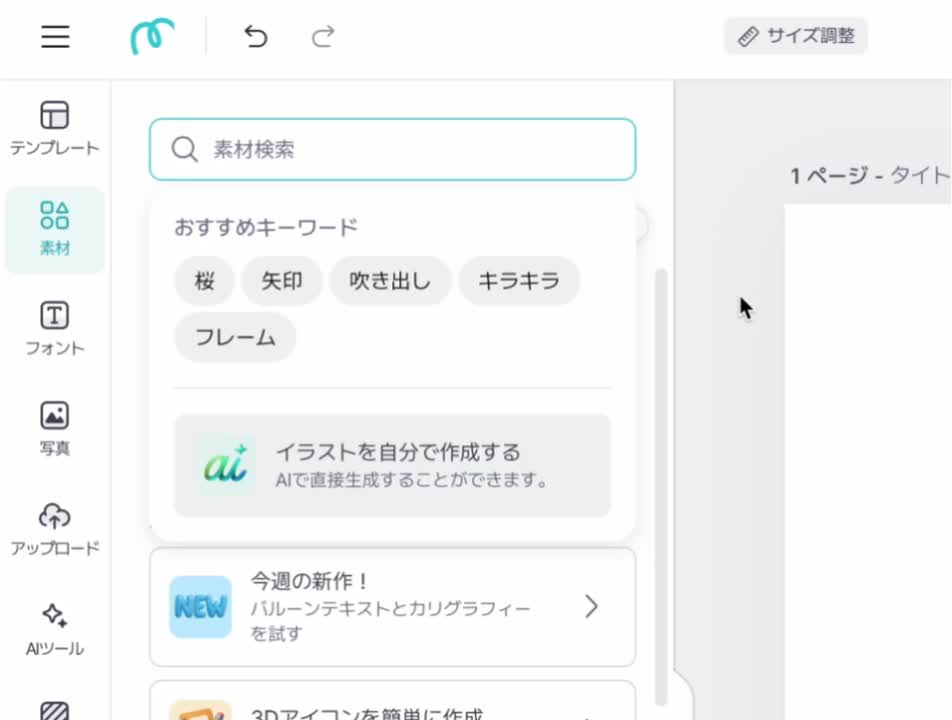
Choose your desired design type in Miricanvas, such as a presentation, Instagram post, YouTube thumbnail, or flyer.
Search for "loose_Drawing" in the search bar under the [Elements] → [Illustrations] tab.
Select the illustration you want to use.
Freely edit the colors, shadows, and animation effects of your selected illustrations.
Download your completed design featuring Loose Drawing illustrations in your preferred format, such as PPT or PDF.

Describe the style you want in text, and the AI will quickly generate the image.

From background removal to resolution enhancement, the AI handles it all with ease.

Just enter a topic, and the AI will automatically complete the slide layout and design.

Yes. You can use Loose Drawing illustration assets for free on MiriCanvas. Some assets may be provided as paid content. By using a Pro plan, you can access over 30 million diverse assets provided by MiriCanvas, including Loose Drawing.
Yes. Loose Drawing illustration assets provided by MiriCanvas can be used commercially. You are free to use them in business materials, advertisements, and more. Please check the MiriCanvas Help Center for detailed usage scope and conditions.
Select the AI Presentation feature in MiriCanvas and enter your topic, and the AI will automatically generate slides tailored to it. You can freely edit the generated slides and save them in PDF or PPT format for use.
Adding intuitive Loose Drawing illustrations to your AI-generated slides makes your message clearer and more visually appealing. It helps you complete presentations, proposals, and more with a stylish and professional design.