
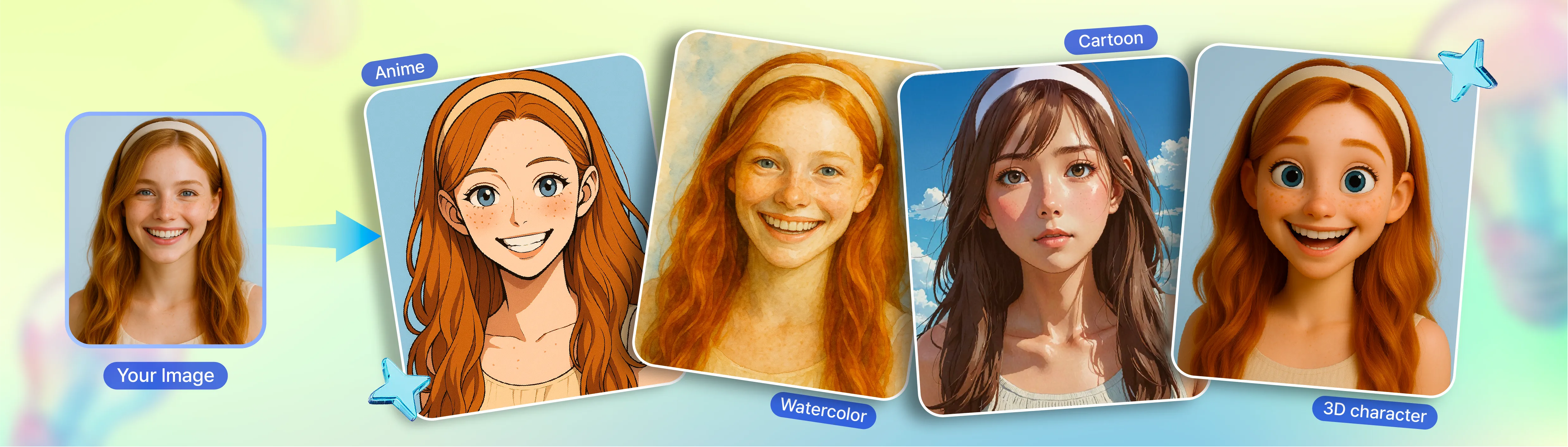
Photo to Anime: Transform your photo into anime-style art with just one click

Ever wondered how you’d look in an anime? Try our photo to anime converter—powered by AI.
Create anime versions of yourself with zero effort—start for free.
Example images showing the original image transformed with various styles

Turn your photo into anime or cartoon art

Want to turn your photo into anime or cartoon-style art?
Upload any image and transform it into stunning digital artwork—anime, cartoon, watercolor, or oil painting—using AI.
Just add a short prompt, and let the AI do the magic.
Perfect for creating anime portraits, cartoon avatars, or artistic illustrations from real-life photos.
Convert Your Image
Example images showing the original image transformed with various editing tools

Customize and complete your AI artwork

Ready to personalize your AI-generated art?
Adjust brightness, saturation, and color tone to fine-tune the look.
Add text for posters, apply stylish filters, or frame it like a gallery piece.
Use stickers, shapes, and illustrations to create a unique anime or cartoon design that reflects your personality.
Convert Your Image

Use your anime-style art in thousands of templates

Show off your AI-generated anime illustrations or cartoon avatars with customizable templates.
Make viral Instagram posts, click-worthy YouTube thumbnails, or print-ready posters and business cards.
Your anime-style images are perfect for greeting cards, social media, invites, and personal branding.
Get creative—no drawing skills or design software needed.
Convert Your Image
Editor screen showing the transformed image applied to a MiriCanvas template

One image, infinite style variations

Convert a single photo into watercolor, sketch, pixel art, or 3D renderings. Keep the same composition while producing completely different looks—perfect for tailoring content to different channels and platforms.
Teacher icon
For Teachers
Transform photos of school events and classroom activities into stylish illustrations. Create memorable designs for yearbooks and event posters that students will love.
Contents creator icon
For Content Creators
Turn your selfies into unique, view-grabbing thumbnails by applying anime or cartoon styles. Add a creative flair to your thumbnails and profile pictures.
General user iocn
For General Users
Convert photos of your loved ones into a warm watercolor or classic oil painting. Add a touching, artistic element to graduation, anniversary, or birthday cards.

Compare the stunning contrast between originals and variations

Watch the same photo turn into watercolor, pixel art, or 3D rendering. From portraits converted into anime style to product photos turned illustrative, compare results across cases to find the look you want.
Self-introduction presentation cover 1 using the AI Photo to Anime feature
Self-introduction presentation using the AI Photo to Anime feature
Medical Presentation cover using the AI Photo to Anime feature
Company introduction presentation cover using the AI Photo to Anime feature

Explore Various Designs Created with AI Image Converter

Check out templates actually completed using MiriCanvas's miricle AI. Get inspired for your own design ideas by seeing the results of various AI functions like image generation, background removal, and icon creation.
Self-introduction presentation cover using the AI Photo to Anime feature
Medical Presentation cover using the AI Photo to Anime feature

How to Use

Miricle screen demonstrating the use of the AI image transformation feature
1
Click the button below to access the "miricle" page.

2
Choose your desired illustration style like Japanese Anime, Cartoon, city pop, etc.
3
Upload the image you want to convert to illustration and enter a prompt describing the desired atmosphere or details.
4
Click the "Create" button and AI will convert the image to illustration according to the selected style and prompt.
5
Download the completed illustration and use it in various places like SNS profiles, YouTube thumbnails, blogs, presentations, etc.
Convert Your Image

FAQ

Is the AI photo-to-illustration tool available for free use?

Yes, it's free to use with daily credits.The number of credits depends on the style you select.
Need more? Get extra credits with the Pro plan.

What illustration styles can I choose from?

We support a wide range of styles:
- Watercolor: soft and artistic
- Oil painting: classic with rich textures
- Anime: bright, character-focused visuals
- Cartoon: fun and friendly
- 3D illustration: bold and dimensional
Each style has its own unique mood and feel—choose the one that best suits your vision.

How should I write a prompt for better results?

Describe the style and mood you want clearly.
For example:
- “Bright and cheerful anime style”
- “Warm watercolor style”
- “Dreamy and surreal atmosphere”
Adding details about color tone or visual elements helps the AI deliver more accurate results.

How long does it take to turn a photo into an illustration?

It usually takes 30 seconds to 2 minutes.
Time may vary depending on the photo’s size, complexity, chosen style, and server traffic.
More detailed images may take longer, but they also result in more refined artwork.

Design, write, and edit faster with miricle AI.

See Authentic Reviews from MiriCanvas Users

Honest and genuine stories from actual users of Miricanvas. Discover how their design process has changed and how much their work efficiency has improved.

"Needed a custom background for our mental health campaign. Typed 'calm forest with pastel tones' into the AI generator and got exactly what I was looking for in under a minute. Way better than scrolling through stock photo sites for hours."

Content Marketer

"I needed visual aids for my AP History class and didn't have time to learn Photoshop. This was way easier than PowerPoint for making infographics. Students actually pay attention when the materials look decent."

High School Teacher

"The AI-powered tools, like auto-generating slides from text or prompts, save a lot of time, especially during exam season or tight deadlines. It’s both beautiful and practical."

Student

See Authentic Reviews from MiriCanvas Users

Honest and genuine stories from actual users of MiriCanvas.
Discover how their design process has changed and how much their work efficiency has improved.

"Needed a custom background for our mental health campaign. Typed 'calm forest with pastel tones' into the AI generator and got exactly what I was looking for in under a minute. Way better than scrolling through stock photo sites for hours."

Content Marketer

“We wanted to test A/B creatives for Instagram ads. I used the AI Image Generator to create multiple visual variants of the same concept just by tweaking the prompt slightly. Saved me hours of manual design work.”

Social Media Manager

“The AI-powered tools, like auto-generating slides from text or prompts, save a lot of time, especially during exam season or tight deadlines. It’s both beautiful and practical.”

Student

"I needed visual aids for my AP History class and didn't have time to learn Photoshop. This was way easier than PowerPoint for making infographics. Students actually pay attention when the materials look decent."

High School Teacher

"We're always on a tight budget for marketing materials. This lets us create professional-looking fundraising flyers and event posters without breaking the bank. Board members are impressed with how polished everything looks now."

Program Coordinator

Start designing today!

Create a design
